
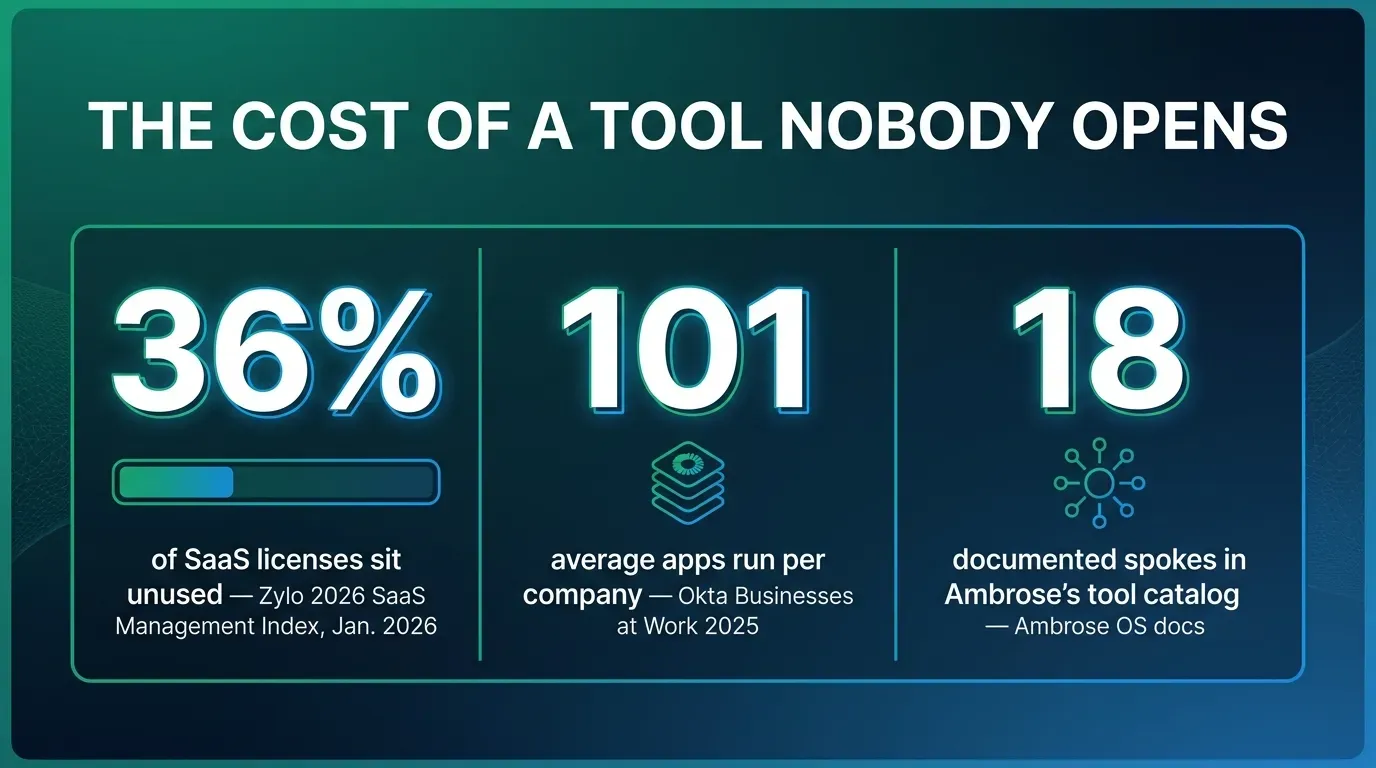
Put the AI assistant where your team already spends the day: Slack. That’s the whole idea, and the reason it works is boring rather than clever — the average organization now leaves 36% of its paid SaaS licenses unused, according to Zylo’s 2026 SaaS Management Index, built on the company’s own analysis of more than 40 million licenses and $75 billion in software spend it manages (Zylo, 2026 SaaS Management Index). A dashboard nobody opens doesn’t stop billing you just because it’s a good product. This guide covers why a new tool gets ignored even when it works, what that costs, how to build a basic AI assistant inside Slack yourself with nothing but a Slack app and an API key, what never belongs in that bot’s inbox, and how Ambrose’s Slack router mode handles the same job with a compliance layer a homemade bot doesn’t have.
Key takeaways
- The average organization leaves 36% of its SaaS licenses unused, per Zylo's 2026 SaaS Management Index — a tool doesn't have to be bad to go unused, it just has to live somewhere the team doesn't already go.
- The average company now runs 101 separate applications, per Okta's 2025 Businesses at Work report — every new login is a new habit you're asking a busy team to form.
- You can build a working AI-in-Slack bot yourself this week: a Slack app, four OAuth scopes, one event subscription, and a call to any AI API. This article shows the exact steps.
- A homemade bot has no PHI scrubbing. Never paste a client's name paired with a health condition, medication, or ID number into it, in any channel.
- Ambrose's Slack integration ships two modes — bound (one bot, one team) and router (one bot, every team by name) — and a router bot inherits the underlying agent's PHI Rail, so only de-identified content leaves for a non-BAA destination (Ambrose docs, int-slack; arch-phi-rail).
The pain: you bought the AI tool, and your team is still doing the work in Slack
Here’s the pattern, and if you run an agency with more than one seat, you’ve probably lived it: someone signs the agency up for an AI assistant, a new CRM module, a reporting dashboard, whatever the pitch was. It gets a channel announcement, maybe a training call. Two weeks later, the actual work — “does this client’s plan still cover their specialist,” “did the renewal go out,” “what’s our answer to this objection” — is still happening the way it always did: someone typing the question into the team’s Slack channel and waiting for whoever’s around to answer from memory.
The tool isn’t necessarily bad. It’s just sitting behind a login the team doesn’t already have open. Slack, or whatever chat tool your team actually lives in, was already open. The new dashboard wasn’t. That’s the entire gap, and it’s wider than most agency owners assume: Okta’s 2025 Businesses at Work report, drawn from anonymized usage data across thousands of customers in the Okta Integration Network, found the average company now runs 101 separate applications — a company crossing the 100-app mark for the first time in the report’s history (Okta, Businesses at Work 2025). A five- or fifteen-person insurance agency isn’t running 101 apps, but the direction of the number matters more than the exact count: every agency is adding tools faster than any one person can remember to open them, and the chat app is the one constant nobody has to be reminded to check.
This is a general business pattern, not an insurance-specific study
The Zylo and Okta figures in this article come from general business SaaS data, not an insurance-agency-specific survey — we found no independently published, methodology-backed study of software adoption inside health and life insurance agencies specifically, and we're not going to dress up a general number as an insurance one. The reason the pattern still applies is mechanical, not statistical: a tool that requires a new login competes with the channel your team already has open, in any industry, at any size.
Why this actually happens: every new login is a new habit, and habits lose to defaults
Nobody decides, on purpose, to ignore a tool the agency paid for. What happens instead is smaller and more human: the question comes up mid-conversation, in the channel where the conversation is already happening, and answering it there is one less click than opening a new tab, finding the right dashboard, and running a search. Do that enough times and the “new tool” habit never forms, because the old default — ask in Slack — never had to compete on convenience. It just won by default, every single time, before anyone consciously chose it.
This is the same mechanism behind Zylo’s 36% unused-license figure. Their 2026 index is built on real usage telemetry across the licenses they manage, not a survey asking people to self-report — which is exactly why the number holds up as a real pattern instead of an opinion. A license isn’t “unused” because the tool is broken. It’s unused because logging into it was never the path of least resistance for the person who needed an answer in the next thirty seconds.
| Finding | Figure | Source & period |
|---|---|---|
| Average SaaS licenses left unused | 36% | Zylo, 2026 SaaS Management Index (40M+ licenses, $75B spend analyzed) |
| Average number of apps run per company | 101 | Okta, Businesses at Work 2025 (Okta Integration Network data) |
| Named integrations listed on Ambrose's Integrations page | 12 | Ambrose docs, Integrations page (as of this writing) |
| Documented spokes (tool servers) in the current Ambrose catalog | 18 | Ambrose docs, Spokes catalog (as of this writing) |
Average SaaS license utilization
Zylo, 2026 SaaS Management Index — licenses used vs. left idle, organization-wide average.
Source: Zylo, 2026 SaaS Management Index, built on analysis of more than 40 million SaaS licenses and $75 billion in software spend under management.
What it actually costs
Zylo’s figure is an enterprise-wide average, not a small-agency number, and it would be dishonest to hand you a made-up dollar figure scaled down to “your agency size” that no one has actually measured. What’s real and worth sitting with is the shape of the cost, which does scale down: every unused seat is a recurring charge with nothing behind it, every unopened dashboard is a second place client information now lives that somebody has to remember to secure, and every “we bought a tool for that” answer that turns out to be false the next time a client calls is a credibility cost with your own team, not just a budget line. A ten-person agency running four or five underused tools isn’t hypothetical — it’s the same math as the enterprise figure, just with fewer zeros.
There’s a second cost that’s specific to insurance work and doesn’t show up in a SaaS spend report at all: the information gap. If the “smart” tool holding your plan data, your book of business, or your compliance notes sits behind a login half your team never opens, the actual answer to a client’s question is still living in one person’s memory, or in a Slack thread from three weeks ago that’s already scrolled off. That’s not a software problem. It’s a “the answer exists somewhere, just not somewhere anyone can find it fast enough” problem, and it’s the same failure mode whether the unused tool cost $20 a month or $2,000.
A tool nobody opens isn't free just because you're not thinking about it. It's still on the invoice, and the answer it holds is still stuck behind a login your team learned to route around.
Mike MooreThe manual method: build an AI assistant in Slack yourself, this week
None of what follows requires a membership, a platform, or even much of a budget beyond whatever the AI API calls themselves cost, which for a small team’s message volume is usually a few dollars a month. Here’s the actual build, the same shape of setup Ambrose’s own documentation describes for agencies that skip its one-click Slack install and configure things manually — which tells you it’s a real, working pattern, not a simplified version for a blog post.
Create a Slack app
Go to api.slack.com/apps, create a new app "from scratch," and pick your workspace. This gives you an app you control, with its own bot user, separate from any personal account.
Add the bot token scopes
Under OAuth & Permissions, add app_mentions:read so it can see when it's tagged, chat:write so it can reply, and channels:history plus im:history and im:read if you want it to read context in a channel or DM, not just the mention itself. Install the app to your workspace and copy the Bot User OAuth Token (Slack developer docs, OAuth installation and bot token scopes).
Turn on Messages and subscribe to events
Enable the Messages Tab under App Home, then under Event Subscriptions turn on events and subscribe to app_mention and, if you want DMs to work, message.im. Slack will need a URL to send those events to.
Stand up a small handler
A minimal script or a no-code automation tool receives the event, pulls out the question text, and forwards it to an AI API. Anything that can receive a webhook and make an HTTP call works — you don't need a dedicated backend for a first version.
Call the AI, then post the reply back
Send the question to whichever AI API you're using, take the text response, and call Slack's chat.postMessage with the same channel and thread timestamp so the answer lands as a threaded reply, not a new message at the bottom of the channel.
Test it on questions with no client data in them
Before anyone uses this on a real book of business, run it on generic questions only — plan terminology, a marketing copy draft, a general compliance question. That's the boundary the next section covers, and it's the one homemade setups get wrong first.
This is the whole method
Create a Slack app, add four bot scopes, subscribe to app_mention, forward the text to an AI API, and post the reply back into the same thread. That's a working AI assistant in Slack, built with a free Slack app and whatever the API calls cost. Nothing above requires a platform purchase.
This gets your team an assistant in the channel they already have open, and it genuinely works for general questions. What it does not have is any of the following: a way to know which “team” (renewals, new business, claims support) should answer a given question, any scrubbing of client identifiers before they leave your Slack workspace and reach the AI vendor’s servers, or a log of what was asked and answered that you could hand a regulator or an E&O carrier if it ever came to that. Those three gaps are exactly where the next two sections go.
What never belongs in a general-purpose AI bot’s inbox
This is the part every DIY setup skips, and it’s the part that actually matters once the bot is good enough that people start asking it real questions instead of test ones.
A general AI API, called the way the walkthrough above describes, sends whatever text you give it straight to that vendor’s servers. No scrubbing happens in between unless you build it yourself, and most agencies don’t, because it’s a genuinely harder engineering problem than the bot itself. That means a message like “does John Alvarez’s Medicare Advantage plan cover his cardiology visits, his policy number is…” goes to the AI vendor exactly as typed, sitting in a Slack channel other teammates can scroll back through, indefinitely, unless someone manually deletes it.
Never type a client’s name paired with a health condition, a diagnosis, a medication, a Medicare Beneficiary Identifier, a Social Security number, or a date of birth into a bot like this — in a public or private channel, in a DM, doesn’t matter. Ask the question generically instead: “does a standard MAPD plan typically cover cardiology visits” gets you a useful, safe answer. “Does John’s plan cover his cardiology visits” does not, even though it feels like the more natural way to type the question when you’re moving fast.
A shared channel is worse than a private chat window for this
A one-on-one conversation with a chatbot at least limits who sees the message. A team Slack channel doesn't. Anyone with channel access can scroll back and read a client's health information months later, and that record now exists in two places — your CRM and a Slack channel history — instead of one, with only one of those two actually built to protect it.
This is also where the NAIC’s Model Bulletin on the Use of Artificial Intelligence Systems by Insurers becomes directly relevant, not as a footnote. Adopted in December 2023 and since taken up by a growing number of state insurance departments, it sets an expectation that AI use runs through governance: written policies covering how the tool is used, a human reviewing anything consequential before it reaches a client, records of what the AI was asked and what it produced, and accountability for AI tools built by an outside vendor, the same as any tool you built in-house (NAIC, Artificial Intelligence topic page). A homemade Slack bot with no logging, no scrubbing, and no written policy behind it doesn’t meet that bar just because it’s convenient. Write down, in one page, what the bot may and may not be asked, before your team starts treating it as a shortcut around a real client lookup.
How Ambrose’s Slack router mode handles the same job, with the compliance layer built in
Everything above works, and it’s real — build it if you want to see the shape of the problem for yourself before you decide whether to hand it to a platform. Where Ambrose, the AI platform included with a Tech Savvy membership, picks up the same job is at exactly the two gaps the manual version has: routing to the right team, and not sending raw client identifiers to a model that isn’t covered by a BAA.
Per Ambrose’s own Slack documentation, its Slack integration ships in two modes. Bound mode connects one Slack bot to one fixed agent or team — tag it, and it always answers as that persona, the simplest setup for a single-purpose bot. Router mode is one bot that reaches every team in your agency by name: mention it with a team identifier before a colon, like @Ambrose renewals: which clients renew this quarter?, and it resolves that to the renewals team specifically instead of a generic assistant (Ambrose docs, int-slack). Resolution runs through a defined hierarchy — an exact slug match first, then an exact name match, then a unique prefix or substring, so typing “renewals” resolves to a team actually named “renewal-manager.” If nothing matches, it doesn’t guess: “the bot replies with the list of teams you can reach,” and an ambiguous partial match gets you a request to be more specific. In a direct message, you skip the @mention entirely and just start with the team name and a colon. Replies always land in the same thread as the original message, so the channel doesn’t turn into a wall of unthreaded bot replies.
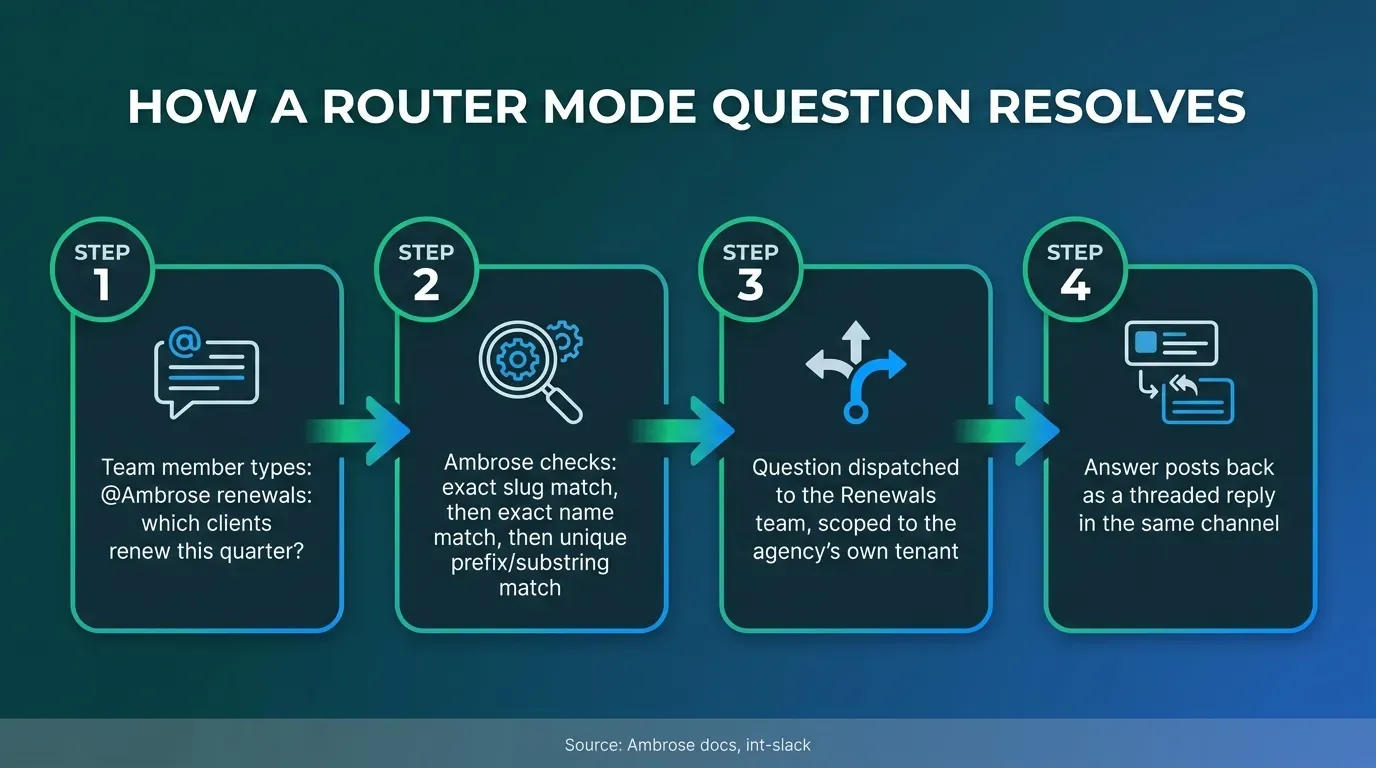
The part a homemade bot can’t match without real engineering work is what happens to the message before it reaches a model. Per Ambrose’s architecture documentation, the PHI Rail checks whether a given destination is on the agency’s BAA allowlist. For a non-BAA destination, it runs the content through PHI Gateway, which aliases identifiers — names, emails, and similar — into typed placeholders like PERSON_xxxx before the model ever sees the real values, then splices the real values back into the response afterward using the original mapping, logging every scrub event (timestamp, source, identifier counts, never the actual values) without storing the sensitive data itself (Ambrose docs, arch-phi-rail). Ambrose’s Slack documentation confirms a router bot inherits this from whichever agent or team it’s dispatching to: “only de-identified content leaves under the configured mode” (Ambrose docs, int-slack). That’s the exact gap the DIY walkthrough above flagged, closed by architecture rather than a rule someone has to remember to follow every time they type a question.
| Capability | Manual Slack app + API | Ambrose router mode |
|---|---|---|
| Answers a general question in-thread | Yes, once built | Yes |
| Routes to the correct team by name | No, one bot answers as one persona unless you build routing logic yourself | Yes — slug, then name, then prefix/substring match (Ambrose docs, int-slack) |
| Scrubs client identifiers before a non-BAA model sees them | No, not unless you build a redaction layer yourself | Yes — PHI Rail aliases identifiers, then rehydrates the response (Ambrose docs, arch-phi-rail) |
| Logs what was scrubbed, without storing the values | No, not by default | Yes — every scrub event logged, queryable (Ambrose docs, arch-phi-rail) |
| Setup path | Manual: Slack app, OAuth scopes, event subscription, your own handler | One-click "Add Ambrose to Slack" install, or the same manual scopes if preferred (Ambrose docs, int-slack) |
Setup itself mirrors the DIY version almost exactly, which is worth knowing whether or not you ever use it: Ambrose’s one-click “Add Ambrose to Slack” button installs a router bot with, per its own documentation, “no Slack app to create, no scopes to add, no tokens to copy.” For a workspace that prefers manual control, the fallback path uses the same OAuth scopes this article’s walkthrough used — app_mentions:read, chat:write, im:history, im:read, channels:history, users:read — plus the Messages Tab and the same two event subscriptions (Ambrose docs, int-slack). Sign in with Slack is also available for account access, so a team member can authenticate with the Slack identity they already have instead of creating a new password for one more login — closing the loop on the exact “new login, new habit” problem this whole article opened with.
Name the mechanism, not just "AI in Slack"
The specific things worth naming are router mode's slug/name/prefix resolution hierarchy and the PHI Rail's alias-then-rehydrate pipeline, not a general claim that "Ambrose is safe" or "Ambrose is smart." Both are documented, checkable behavior, not a marketing description, and both map directly to the two gaps the manual version of this build actually has.
What you get by joining
One Ambrose seat, including Slack router mode and the PHI Rail described above, comes included with a Tech Savvy Insurance membership: $97 a month, billed monthly, cancel anytime, with the founding rate locked in while the membership stays active. Ambrose usage runs through its own credit ledger with spend caps, so cost stays visible instead of showing up as a surprise later. Alongside the seat: weekly Zoom calls with open Q&A and build-with-you sessions, more than 30 hours of recorded training, Meta Ads and marketing training built for this industry, pre-built AI templates and bot deployments, and a free annual in-person member workshop. It’s also an explicit no-recruiting zone — you can ask a real question about your Slack setup without someone sliding into your DMs about a downline an hour later, which isn’t true of most agent Facebook groups.
Close
Everything above, the Slack app, the OAuth scopes, the event subscription, the call to an AI API, works whether you ever join anything or not. Build it this week if you want to see the shape of the problem for yourself, and be strict about the one rule that actually matters: nothing with a client’s name and a health detail in the same message, ever, in any channel, until you know exactly where that text is going. If you’d rather see the same assistant wired into every team by name, with client identifiers scrubbed before they leave your workspace and a log of every scrub event, that’s what Ambrose’s Slack router mode already does, and one seat comes with a Tech Savvy membership: https://techsavvyinsurance.com/. See also our guide on AI for insurance agents in 2026 and our breakdown of what a lean agency tech stack actually costs.
Before you act on any of this
Tech Savvy Insurance is a training and software community, not an insurance company, agency, or law firm, and does not provide insurance, legal, tax, or compliance advice. You are responsible for your own licensure and for complying with HIPAA, the NAIC's AI Model Bulletin as adopted in your state, CMS marketing and TPMO rules where applicable, and your carriers' own vendor and data-handling requirements. AI-generated outputs, including from any tool described in this article, may contain errors: always verify before acting on them. Results may vary.
Frequently asked questions
Sources
- Zylo — 2026 SaaS Management Index (published Jan. 29, 2026) — zylo.com
- Okta — Businesses at Work 2025 (published Mar. 12, 2025) — okta.com
- NAIC — Artificial Intelligence (topic page, Model Bulletin background) — content.naic.org
- Ambrose docs — What is Ambrose — app.hiambrose.com
- Ambrose docs — Integrations — app.hiambrose.com
- Ambrose docs — Slack integration (int-slack) — app.hiambrose.com
- Ambrose docs — PHI Rail architecture — app.hiambrose.com
- Ambrose docs — Spokes (catalog) — app.hiambrose.com
- Slack developer docs — OAuth installation and bot token scopes — docs.slack.dev
Ready to put this into practice?
Join a private community of Health & Life insurance professionals using AI, Meta Ads, and automation to grow — without draining their bank account.
Join Tech Savvy — $97/month